FREE EXCEL TEMPLATE
Construction Change Order Log for General Contractors
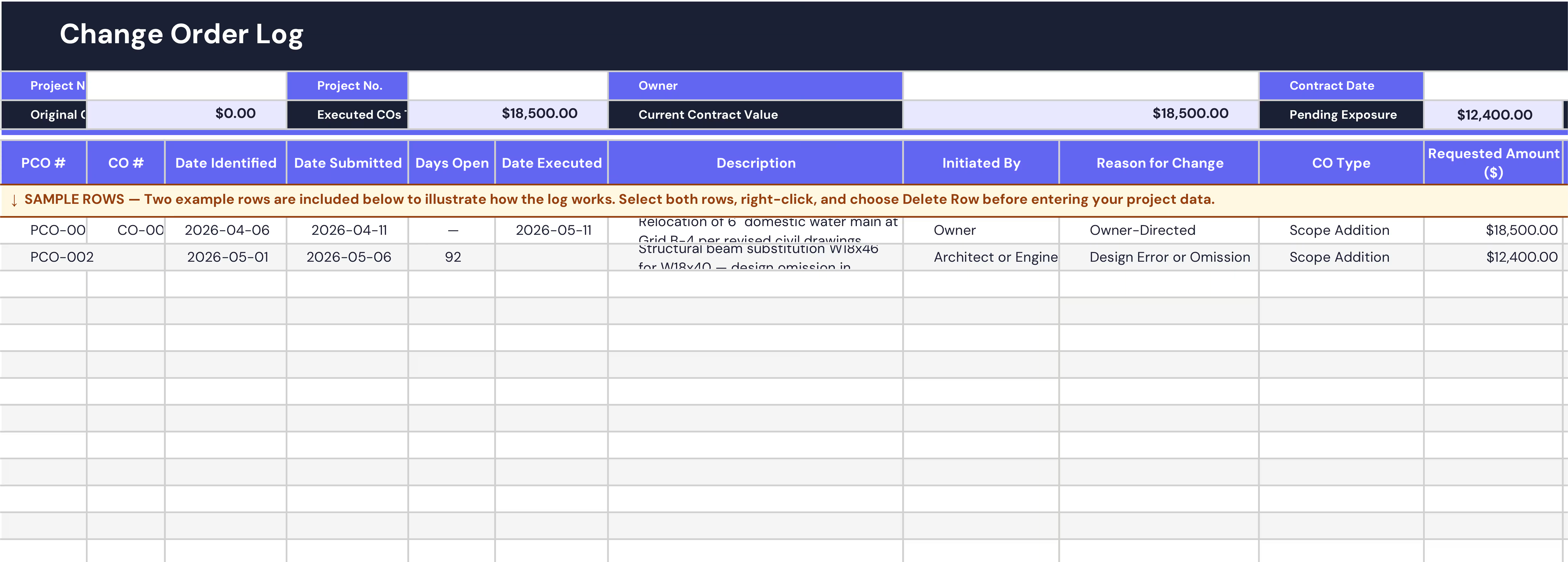
Track every Potential Change Order (PCO) and Change Order (CO) from first identification to executed contract. Know your current contract value, pending exposure, and schedule position at any point, before your next OAC meeting.
- AIA G701 aligned
- PCO -> CO lifecycle
- Live contract position summary
- Free Excel download
Oops! Something went wrong while submitting the form.
WHAT'S INSIDE
Everything you need to run a clean change log
No unnecessary complexity. Built to give you the right information at the right moment, from the first PCO to final contract reconciliation.
- Live contract position summaryOriginal contract value, executed COs, current contract value, pending cost exposure, and schedule days, all auto-calculated at the top of every session.
- PCO to CO numbering Separate columns for internal PCO reference and formal CO number, aligned with AIA G701 practice. Log the potential change the moment it's identified.
- Aging flags on open items Orange highlight for open PCOs beyond 30 days. Red for beyond 60. Conditional formatting fires automatically with no manual review needed.
- Ball-in-court tracking Know who is responsible for the next action at all times: Owner, Architect / Engineer, or GC. Clears automatically on closed items.
- Reason for change codes Eight validated reason codes covering Owner-Directed, Unforeseen Site Conditions, Design Error or Omission, Regulatory / Code, GC-Initiated, and more.
- How to Use tab Plain-English guidance covering column behavior, PCO vs CO logic, notice obligations under AIA A201, and the reason-for-change code definitions.
Construction Change Order Log for General Contractors
Get the free templateBUILT FOR CONTRACT RIGOR
Not just a tracker. A contemporaneous record.
Change order disputes are won or lost on documentation. This log is designed to produce the evidence trail your project team needs, before the dispute arises.
- Protect your notice rights from day one Most change order disputes are lost not on the merits, but on late notice. This log is built around the date a change was first identified, not when it was priced — because that distinction is what AIA A201 §7.3.7 actually requires.
- Never misreport your contract value An approved change order is not the same as an executed one. This log keeps the two separate, so your reported contract value only reflects what every party has actually signed. No inflated numbers heading into an
- Keep a clean audit trail through revisions When a quoted amount changes, the history should not disappear. The log is structured so revised PCOs are added as new rows, keeping the original submission intact. If a dispute ever reaches arbitration, that chronology matters.
- Report time and cost separately Schedule days agreed in the contract and days still under negotiation are tracked independently. It is a common mistake to combine them. Keeping them apart gives you and the owner an accurate picture of where the schedule actually stands.
WHO USES THIS
Built for the people who own the change process
If you're responsible for contract value, change exposure, or schedule on a GC project, this template was built for your workflow.
- Project Manager Walk into every OAC with a log that's current, organized, and defensible. Know exactly what's open, who has the ball, and what your contract value actually is before anyone asks.
- Project Executive Stop finding out about cost exposure after it's already hit margin. A consistent log format across projects means you can see aging PCOs and pending risk before they become surprises.
- Project Engineer Get a change record that's already structured the way your cost report needs it. Requested vs approved, executed vs pending, and time impact separated from cost, all in one place.
- Estimator See clearly where approved value fell short of what was requested, and why. Use that pattern across projects to sharpen how you price and negotiate future changes.
- VP of Operations Give every PM on your team the same starting point. One consistent format means you can compare change performance across the portfolio instead of reconciling five different spreadsheet styles.
Frequently Asked Questions
What is a construction change order log?

Why log a change before it has a price?
What is the difference between a PCO and a CO?
How does pending exposure work in this template?
What is the AIA G701 Change Order form?
Can I use this across multiple projects?
What should a change order log include?
What's the difference between this template and Shape?
SHAPE FOR CHANGE MANAGEMENT
This template is the manual version of what Shape does automatically.
WITH THIS TEMPLATE
- Manual data entryYou log change events yourself after the fact, relying on the field team to report them to you.
- Static snapshot The log only reflects reality when someone remembers to update it. No live visibility into what's actually happening on site.
- Disconnected from site Site records live in separate systems. Linking evidence to a change event is a manual exercise every time.
WITH SHAPE'S CHANGE TRACKER
- Automatic change detection Change events surface from daily reports, issues raised, and plan variances, with no extra steps from the field team.
- Real-time visibility See every change event as it happens, with cost and schedule implications assessed immediately.
- Built-in evidence trail Timestamped records, photos, and decisions are attached automatically and ready for contract defense.